

As a leading supplier of Server Rack Cabinet Enclosures, I understand the critical importance of keeping dust out of these enclosures. Dust can cause a multitude of problems for servers and networking equipment, including overheating, component failure, and reduced performance. In this blog post, I will share some effective strategies on how to prevent dust from entering a server rack cabinet enclosure.
Understanding the Risks of Dust in Server Rack Cabinet Enclosures
Before delving into prevention methods, it's essential to understand why dust is such a significant concern. Dust particles can accumulate on server components, such as fans, heatsinks, and circuit boards. Over time, this buildup can impede airflow, causing servers to overheat. Overheating is one of the leading causes of server failure and can lead to costly downtime and data loss.
In addition to overheating, dust can also cause electrical shorts and corrosion. When dust particles come into contact with electrical components, they can create a conductive path, leading to short circuits. Corrosion can occur when dust contains moisture or chemicals, which can damage the metal parts of the server.
Sealing the Enclosure
One of the most effective ways to prevent dust from entering a server rack cabinet enclosure is to ensure it is properly sealed. This involves checking for any gaps or openings in the cabinet and sealing them with appropriate materials.
- Inspect the Cabinet: Regularly inspect the server rack cabinet for any signs of damage or wear. Look for gaps around doors, vents, and cable entry points. Even small gaps can allow dust to enter the enclosure.
- Use Gaskets and Seals: Install gaskets around doors and vents to create a tight seal. These gaskets can be made of rubber or silicone and are designed to prevent dust and debris from entering the cabinet. For cable entry points, use cable grommets or seals to fill any gaps around the cables.
- Seal the Bottom of the Cabinet: The bottom of the server rack cabinet is another area where dust can enter. Use a solid base or a raised floor to prevent dust from rising up into the cabinet. If the cabinet is placed on a raised floor, ensure that the floor tiles are properly sealed.
Air Filtration
Another important strategy for preventing dust from entering a server rack cabinet enclosure is to use air filtration systems. These systems can remove dust particles from the air before it enters the cabinet.
- Install Air Filters: Most server rack cabinets come with built-in air filters. These filters are typically located at the front or rear of the cabinet and are designed to capture dust particles as air is drawn into the cabinet. Make sure to choose filters with a high efficiency rating to ensure maximum dust removal.
- Regularly Replace Filters: Air filters need to be replaced regularly to maintain their effectiveness. Check the manufacturer's recommendations for filter replacement intervals and follow them closely. A clogged filter can restrict airflow and cause the server to overheat.
- Use External Air Filtration Systems: In some cases, it may be necessary to use external air filtration systems to supplement the built-in filters. These systems can be installed in the server room or in the HVAC system to remove dust from the air before it enters the room.
Maintaining a Clean Environment
Keeping the server room clean is also crucial for preventing dust from entering the server rack cabinet enclosure. A dirty environment can generate a significant amount of dust, which can easily find its way into the cabinets.

- Regularly Clean the Server Room: Sweep and mop the floors of the server room regularly to remove dust and debris. Use a vacuum cleaner with a HEPA filter to clean the carpets and upholstery. Avoid using brooms or dry mops, as these can stir up dust and spread it around the room.
- Control Humidity: Maintaining proper humidity levels in the server room can also help prevent dust from accumulating. High humidity can cause dust particles to stick together, making them easier to remove. However, excessive humidity can also lead to condensation, which can damage the servers. Aim for a humidity level between 40% and 60%.
- Limit Access to the Server Room: Restrict access to the server room to authorized personnel only. Require visitors to wear clean shoes and use shoe covers to prevent dust from being tracked into the room.
Choosing the Right Server Rack Cabinet Enclosure
When selecting a server rack cabinet enclosure, it's important to choose one that is designed to prevent dust from entering. Look for cabinets that have the following features:
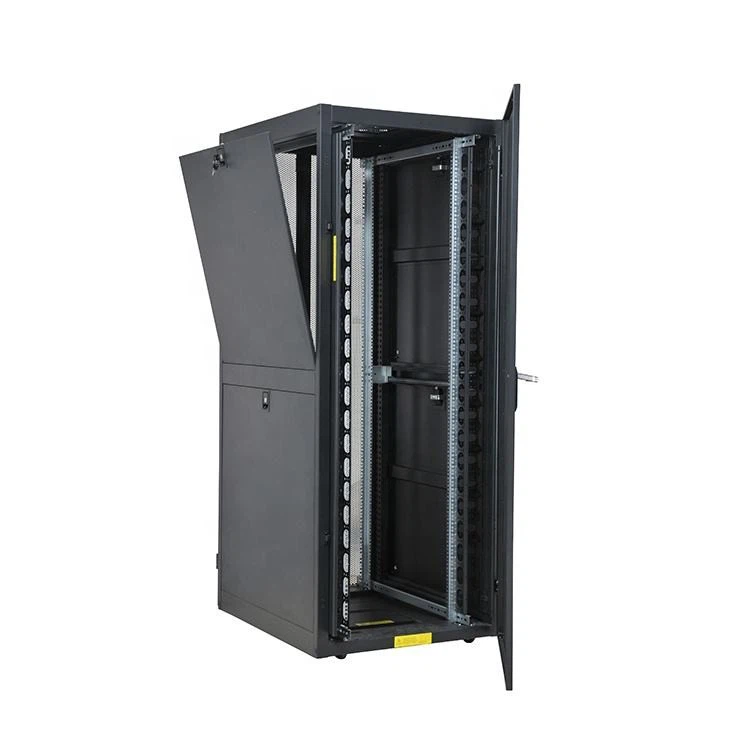
- Dust-Resistant Design: Some server rack cabinets are specifically designed to be dust-resistant. These cabinets may have features such as sealed doors, gaskets, and air filters to prevent dust from entering.
- Proper Ventilation: While it's important to prevent dust from entering the cabinet, it's also essential to ensure proper ventilation. Look for cabinets that have adjustable vents or fans to control the airflow and prevent overheating.
- High-Quality Construction: Choose a server rack cabinet that is made of high-quality materials and is well-constructed. A sturdy cabinet will be less likely to develop gaps or openings over time, which can allow dust to enter.
At our company, we offer a wide range of Custom Server Cabinets that are designed to meet the specific needs of our customers. Our cabinets are made of high-quality materials and are built to last. They are also equipped with advanced dust prevention features, such as sealed doors, gaskets, and air filters.
In addition to custom server cabinets, we also offer 42U Server RACK Cabinet and Network Server Cabinets. These cabinets are available in a variety of sizes and configurations to accommodate different server and networking equipment.
Regular Maintenance
Finally, it's important to perform regular maintenance on the server rack cabinet enclosure to ensure it continues to function properly. This includes cleaning the cabinet, replacing filters, and checking for any signs of damage or wear.
- Clean the Cabinet: Regularly clean the exterior and interior of the server rack cabinet to remove dust and debris. Use a soft cloth or a vacuum cleaner with a brush attachment to clean the surfaces. Avoid using harsh chemicals or abrasive cleaners, as these can damage the cabinet.
- Replace Filters: As mentioned earlier, air filters need to be replaced regularly to maintain their effectiveness. Keep a supply of replacement filters on hand and replace them as needed.
- Check for Damage: Regularly inspect the server rack cabinet for any signs of damage or wear. Look for cracks, dents, or loose parts. If you notice any damage, repair or replace the affected parts immediately.
By following these strategies, you can effectively prevent dust from entering a server rack cabinet enclosure and protect your servers and networking equipment from damage. At our company, we are committed to providing high-quality server rack cabinet enclosures and excellent customer service. If you have any questions or need assistance with selecting the right cabinet for your needs, please don't hesitate to contact us. We look forward to working with you to ensure the reliability and performance of your server infrastructure.
References
- "Server Room Best Practices: Keeping Your Equipment Cool and Clean." TechTarget, https://searchdatacenter.techtarget.com/tip/Server-room-best-practices-Keeping-your-equipment-cool-and-clean.
- "Dust Management in Data Centers." Schneider Electric, https://www.schneider-electric.com/en/white-paper/dust-management-in-data-centers/.
- "How to Protect Your Server from Dust and Dirt." Dell Technologies, https://www.dell.com/support/kbdoc/en-us/000122812/how-to-protect-your-server-from-dust-and-dirt.